3. Dashboard
Owners, managers and admins.
The Dashboard answers "what needs me today?" It opens with a greeting and three quick actions: Add lead, Add customer and Open Calendar.
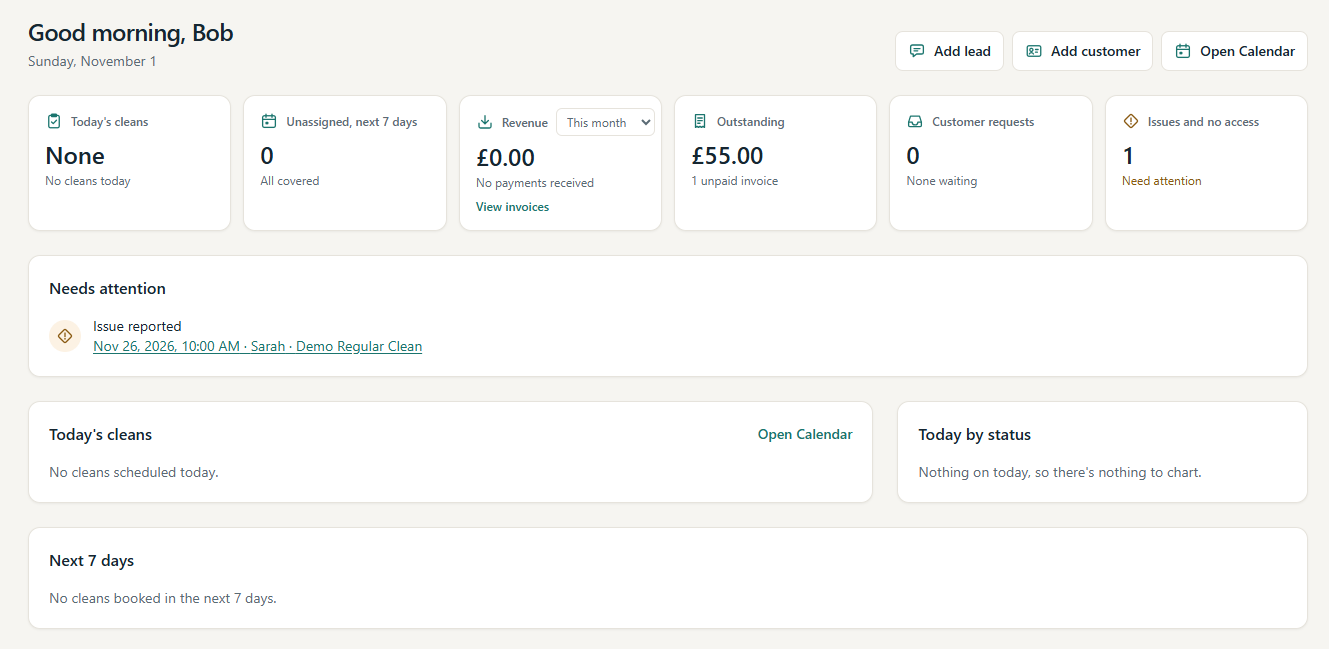
The summary cards
| Card | What it shows |
|---|---|
| Today's cleans | How many cleans are going ahead today, and how many are in progress or completed. |
| Unassigned, next 7 days | Cleans in the next seven days that still need a cleaner ("All covered" when every clean has one). |
| Revenue | Money received in the period you choose (below). |
| Outstanding | What customers currently owe you, and how much of it is overdue. |
| Customer requests | Requests from the customer portal waiting for your decision. |
| Issues and no access | Problems and no-access visits cleaners have reported that need attention. |
Most cards open the page where you deal with them: Today's cleans and Unassigned, next 7 days open the Calendar, Outstanding opens Invoices and Customer requests opens Customer Requests. Revenue and Issues and no access are summary figures: Revenue has its own View invoices link, and each issue or no-access visit is listed under Needs attention with a link to its clean.
Revenue, Outstanding and Overdue
These three figures answer different questions:
- Revenue is money actually received: the total of the payments you have recorded whose payment date falls in the chosen period. Choose the period from the menu on the card: Today, This week (Monday to today), This month (the default), Last 30 days or This year. The card also shows how many payments that is. A part payment counts only the amount actually received.
- Outstanding is what customers owe you now: the unpaid balance of every issued or part-paid invoice. Draft and void invoices are not included, and paid invoices have nothing left to owe.
- Overdue is the part of Outstanding that is late: invoices whose due date has passed. An invoice due today is not overdue yet. The Outstanding card shows the overdue amount in a warning colour, for example "£180.00 overdue".
Changing the Revenue period changes only the Revenue card.
If a figure cannot be loaded, the card says so instead of showing £0.00, so a zero on the Dashboard is always a real zero.
Needs attention
A list of things waiting for you.
Cleans that need something are listed one per row, with the reason and a link to that clean, for example "Issue reported" above "Nov 26, 2026, 10:00 AM · Sarah · Demo Regular Clean". Select the link to open the clean. The reasons are:
- Needs a cleaner: a clean in the next 7 days with nobody assigned;
- Still in progress: a clean still in progress after its scheduled end;
- Issue reported: a cleaner reported an issue that is not resolved yet;
- No access awaiting decision: a no-access visit waiting for your charge decision.
The first five cleans are shown. Show all lists the rest, and Show fewer hides them again.
Below the cleans:
- overdue invoices, for example "2 invoices are overdue" (View invoices);
- customer requests waiting for a decision (Review).
When nothing is waiting, it says All clear. If some checks could not be loaded, it says the list may be incomplete; refresh the page to try again.
Today and the week ahead
- Today's cleans lists today's work in time order, with the customer, service, cleaner (or Unassigned) and status.
- Today by status shows today's cleans by status at a glance.
- Next 7 days shows the number of cleans per day, split into assigned and unassigned, so you can spot busy or uncovered days.